The error, verbatim
Jump to the fix ↓Error: ERR_PNPM_IGNORED_BUILDS
× installing dependencies
╰─▶ Ignored build scripts: esbuild@0.28.2
help: Run "pnpm approve-builds" to pick which dependencies should be allowed
to run scripts.
The fix that worked
Decide every package with a build script in pnpm-workspace.yaml:
allowBuilds:
esbuild: trueTested on
- pnpm
- 10.34.9, 11.28.11, 12.18.0
- Packages
- esbuild 0.28.2, lefthook 2.2.1
- Node / OS
- 24.22.2 / Ubuntu (GitHub Actions); 24.14.0 / Windows 11 for the warning text and the pnpm-workspace.yaml check (re-run November 16)
✓ Last re-run on GitHub Actions · see the run · all repros
Contents
Every answer that says “add the package to onlyBuiltDependencies” was right for pnpm 10, and that’s the version the answer was written on. On pnpm 11 and 12 the same setting is ignored: in package.json pnpm says so with a warning, and in pnpm-workspace.yaml it said nothing (pnpm 12.18.0 on Windows 11, November 16: no warning, the file untouched, the install still failed). Either way the install still exits 1. The setting that works now is called allowBuilds, and it has one rule the old one didn’t: every package with a build script needs a decision.
In pnpm-workspace.yaml (create it next to package.json if you don’t have one), list each package from the error with true to run its script or false to skip it:
allowBuilds:
  esbuild: true
lefthook: falseWhat each pnpm version does with each setting
One project with esbuild 0.28.2 (which has a postinstall script), a clean install every time, November 9, 2026:
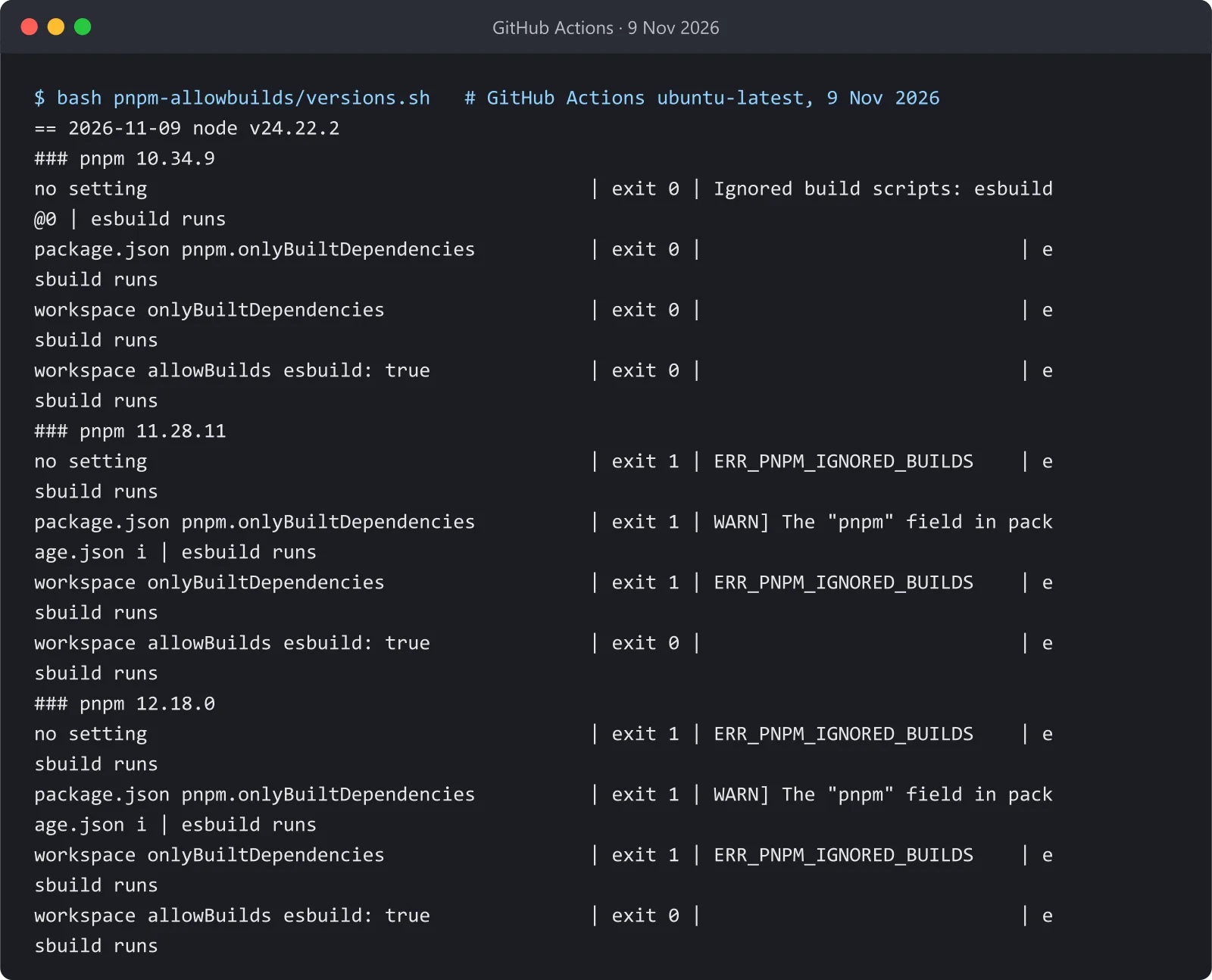
| Setting | pnpm 10.34.9 | pnpm 11.28.11 | pnpm 12.18.0 |
|---|---|---|---|
| none | exit 0, warning only | exit 1 | exit 1 |
pnpm.onlyBuiltDependencies in package.json |
exit 0 | exit 1 | exit 1 |
onlyBuiltDependencies in pnpm-workspace.yaml |
exit 0 | exit 1 | exit 1 |
allowBuilds in pnpm-workspace.yaml |
exit 0 | exit 0 | exit 0 |
Two things stand out. pnpm 10 never failed the install, it only warned, which is why a project can be fine on one machine and broken in CI where the pnpm version is newer. And on 11 and 12 the package.json route fails loudly while the workspace-file route fails silently. The warning from pnpm 12.18.0 for the package.json field:
[WARN] The "pnpm" field in package.json is no longer read by pnpm. The following keys were ignored: "pnpm.onlyBuiltDependencies". See https://pnpm.io/settings for the new home of each setting.Every package needs a yes or a no
With two packages that have build scripts (esbuild and lefthook) on pnpm 12.18.0:
allowBuilds |
Install |
|---|---|
esbuild: true only |
exit 1: lefthook still undecided |
esbuild: true, lefthook: false |
exit 0 |
esbuild: true, lefthook: true |
exit 0 |
esbuild: true, lefthook@2.2.2: true (lockfile has 2.2.1) |
exit 1 |
esbuild: true, lefthook@2.2.1: true |
exit 0 |
So copy every name from the Ignored build scripts: line, not just the one you care about, and decide each one on purpose: false is a real answer, not a failure. And prefer plain names to name@version keys: a name@version key only covers the versions it names, so the next dependency update can break the install again without any change to your config.
Without editing the file: approve-builds and strictDepBuilds
The error suggests pnpm approve-builds, which asks questions when run on its own. With --all (or with package names as arguments) it doesn’t ask, which makes it usable in a script. On pnpm 12.18.0, after a failed install:
pnpm approve-builds --allran both postinstall scripts, exited 0, and wroteallowBuilds:withesbuild: trueandlefthook: trueintopnpm-workspace.yaml. A clean install after that exited 0. Commit that file, and CI is fixed too.strictDepBuilds: falseinpnpm-workspace.yamlmade the install exit 0, but only by downgrading the error to a warning:Ignored build scripts: esbuild@0.28.2, lefthook@2.2.1.The scripts still didn’t run. That’s fine for packages that work without their postinstall step, and wrong for ones that need it, so I’d only use it while you decide.CI=truechanged nothing: the install still failed withERR_PNPM_IGNORED_BUILDS.CI=truealone does not approve anything (pnpm’s settings list adangerouslyAllowAllBuildssetting; I did not test it).
--all approves every pending script, including any you’d rather not run, so read the list it writes before committing it. Turning an entry to false keeps the install passing without running that script.
Which pnpm am I running?
pnpm -v tells you, and it matters: the same project passed on pnpm 10 and failed on 11 and 12. If your CI installs pnpm without a fixed version, it can move to a newer major on its own. Pinning the version in package.json keeps local and CI on the same one:
"packageManager": "pnpm@12.18.0"The runs
GitHub Actions ubuntu-latest, Node 24.22.2, November 9, 2026: pnpm 10.34.9, 11.28.11 and 12.18.0 (each via npx pnpm@<major>), each setting in a fresh folder with a clean install (versions.sh, run 42574261589). The two-package table and the approve-builds --all, strictDepBuilds and CI=true checks ran on pnpm 12.18.0 (run 42561921688, run 42576230630). The warning text, the error block and the pnpm-workspace.yaml check were re-run on Windows 11 with Node 24.14.0 and the same pnpm 12.18.0 on November 16, 2026; at that date the newest releases were 11.28.12 and 12.21.0, so the version numbers above are the ones tested on November 9.
— N.K., end of entry No.105