The error, verbatim
Jump to the fix ↓huggingface-cli: command not found
Tested on
- huggingface_hub
- 0.36.0, 1.0.0, 1.10.0, 1.10.1, 1.16.0, 1.17.0, 1.33.0, 2.0.0, 2.4.0
- Python / OS
- 3.13.18, Ubuntu on GitHub Actions; 3.14.5, Windows 11 Pro (hf 2.4.0 commands)
- Date
- November 8, 2026
✓ Last re-run on GitHub Actions · see the run · all repros
Contents
huggingface-cli isn’t missing from your PATH. The huggingface_hub package simply doesn’t install it any more: the command was renamed to hf, and every huggingface-cli subcommand has an hf equivalent. It’s natural to blame the big 2.0 release of September 24, 2026. I installed nine versions side by side, and the command actually stopped working almost a year earlier, in 1.0.0 (October 27, 2025).
Use hf with the same arguments. The common ones:
| Old command | New command |
|---|---|
huggingface-cli login |
hf auth login |
huggingface-cli whoami |
hf auth whoami |
huggingface-cli download … |
hf download … |
huggingface-cli upload … |
hf upload … |
huggingface-cli env |
hf env |
huggingface-cli scan-cache |
hf cache ls |
huggingface-cli delete-cache |
hf cache rm … |
huggingface-cli repo create … |
hf repos create … |
If hf isn’t found either, the package isn’t installed in the environment you’re running: pip install -U huggingface_hub there.
What each version gives you
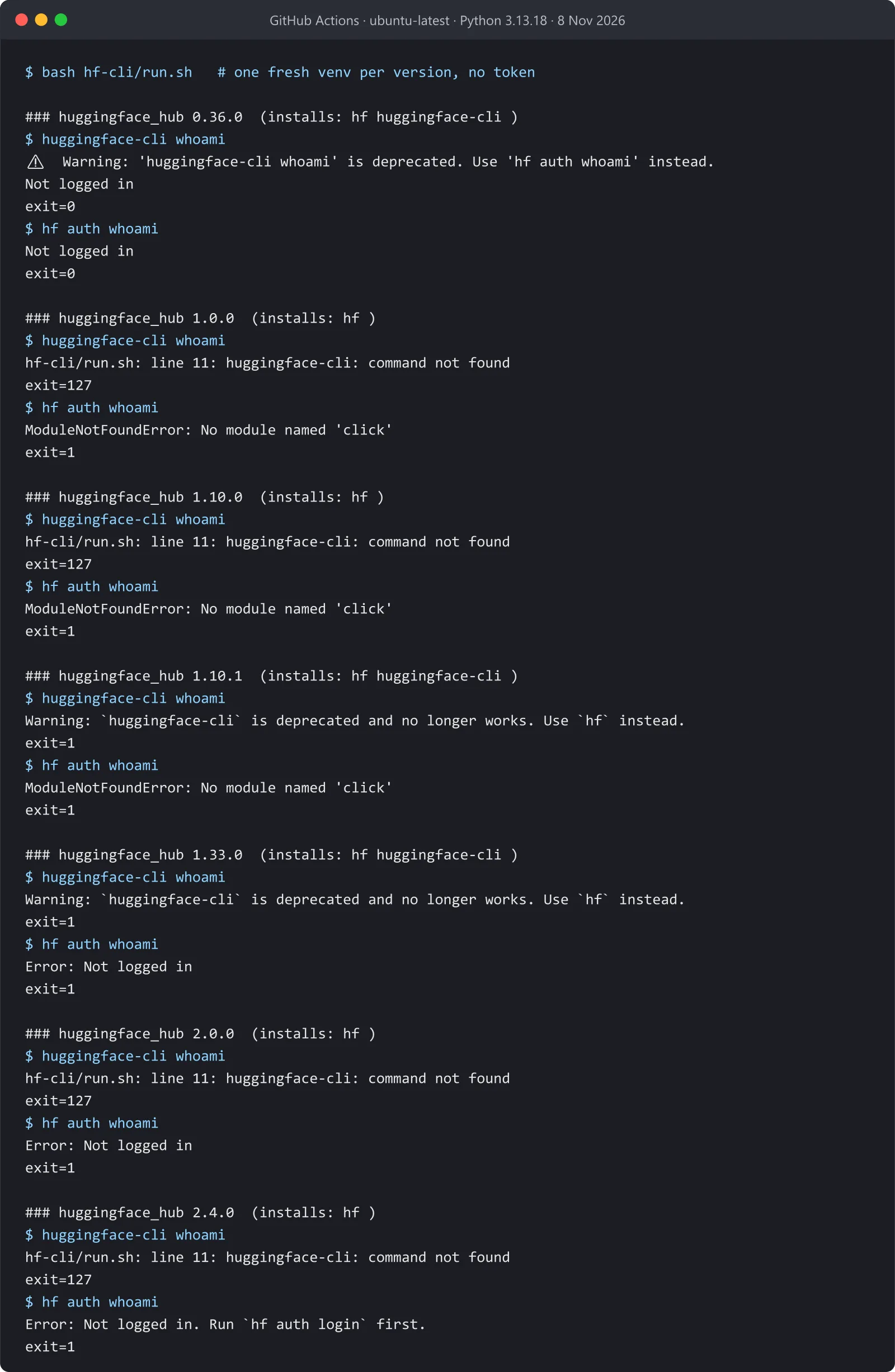
The confusing part is that the command disappeared, came back as a stub that does nothing, and disappeared again. Each version below was installed into its own fresh virtual environment on November 8, 2026, then asked for whoami both ways:
| huggingface_hub | Released | huggingface-cli |
|---|---|---|
| 0.36.0 and older | up to Oct 23, 2025 | works, with a warning to use hf |
| 1.0.0 to 1.10.0 | Oct 27, 2025 to Apr 9, 2026 | command not found |
| 1.10.1 to 1.33.0 | Apr 9 to Sep 24, 2026 | exists, prints “huggingface-cli is deprecated and no longer works. Use hf instead.” and exits 1 |
| 2.0.0 and newer | from Sep 24, 2026 | command not found |
So if you see “deprecated and no longer works”, you’re on a late 1.x release, and the command never ran your arguments; scripts that ignore the exit code may have been silently doing nothing since April. If you see command not found, you’re on 1.0 to 1.10.0 or on 2.x. Either way the fix is the same table above.
Upgrading in place gives the same result as a fresh install: a venv with 0.36.0 had both hf and huggingface-cli, and after pip install -U huggingface_hub==2.4.0 only hf was left.
Why alias huggingface-cli=hf doesn’t work
The tempting shortcut is an alias, so old scripts keep running. It only covers the commands whose names didn’t change. I tried the old subcommand names under hf 2.4.0 on Windows 11:
hf download …,hf upload …andhf lfs-enable-largefilesworked, because they kept their names.hf whoamiandhf loginfailed withError: No such command 'whoami': they moved underhf auth.hf scan-cachefailed withError: No such command 'scan-cache'. Did you mean 'cache'?. The cache commands are nowhf cache ls,hf cache rm,hf cache pruneandhf cache verify.hf repo createfailed too, withError: No such command 'repo'. Did you mean 'repos'?: the group is now plural,hf repos create.
So for scripts, replace the commands one by one using the table above rather than aliasing. The error message at least names the problem, and hf <group> --help lists what’s inside each group.
If hf crashes with “No module named ‘click’”
This one surprised me. On the older 1.x releases, the replacement command was broken too when installed today:
ModuleNotFoundError: No module named 'click'hf is built on the typer library, and versions 1.0.0 to 1.16.x of huggingface_hub accept any typer version. The typer that pip picks today, 0.28.0, no longer brings click along, so hf can’t start. From 1.17.0 on, huggingface_hub asks for click>=8.4.0 and typer<0.26.0 itself, and the problem is gone:
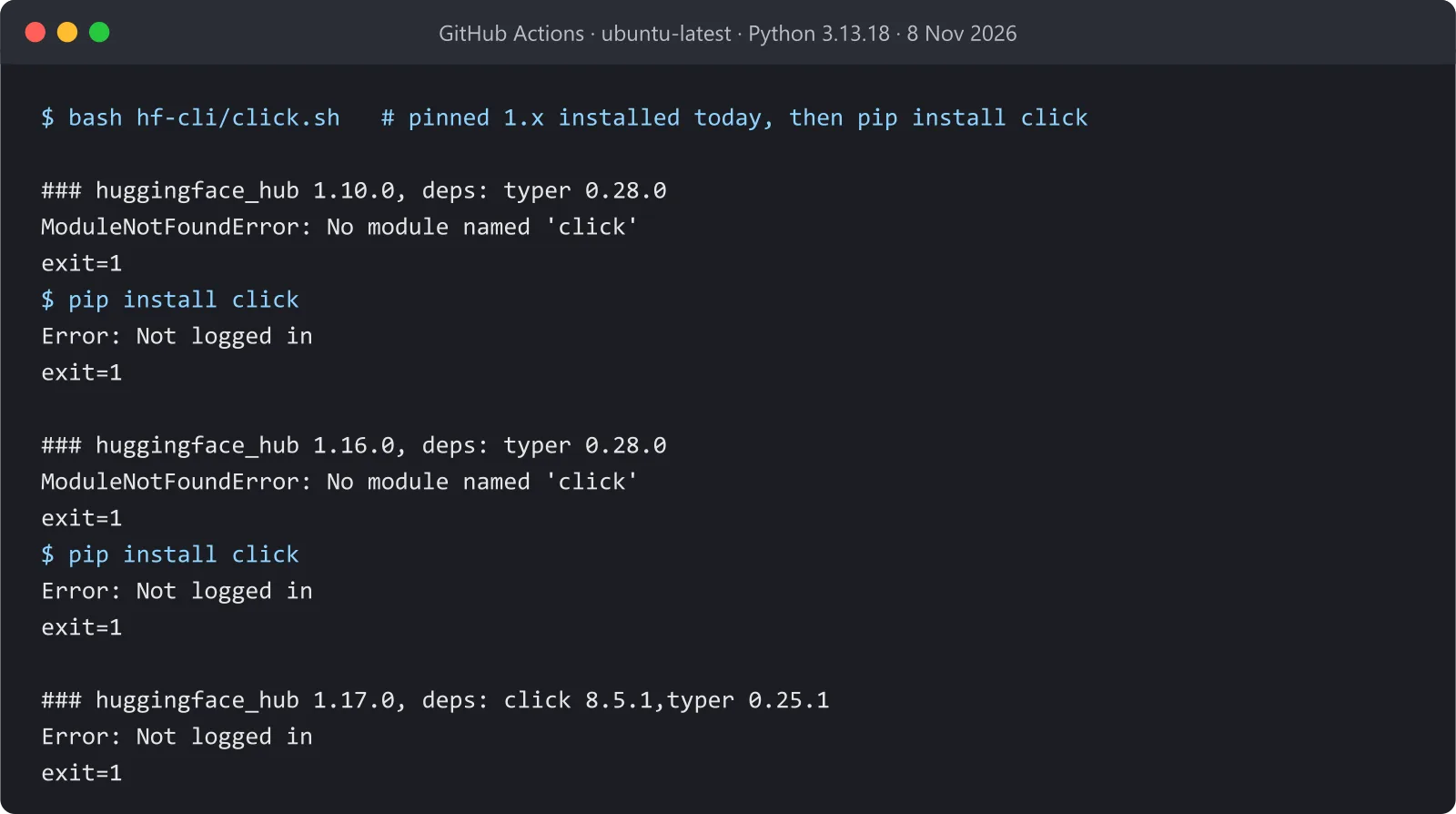
Upgrade huggingface_hub, or, if you must stay on that pin, add click to the same environment:
pip install clickThis matters most for Docker images and requirements files that pin something like huggingface_hub==1.10.0: they built fine months ago, and a rebuild today pulls the newer typer.
Notebooks and Colab
In a notebook, !huggingface-cli login fails the same way, because it runs the same missing command. Use !hf auth login, or log in from Python, which never depended on the command at all:
from huggingface_hub import login
login()
The runs
On November 8, 2026, on GitHub Actions ubuntu-latest with Python 3.13.18: huggingface_hub 0.36.0, 1.0.0, 1.10.0, 1.10.1, 1.33.0, 2.0.0 and 2.4.0, each in a new venv, running huggingface-cli whoami and hf auth whoami without a token, plus an in-place upgrade from 0.36.0 to 2.4.0 and a real hf download on 2.4.0 (run.sh, run 42504610345). The click case ran 1.10.0, 1.16.0 and 1.17.0, before and after pip install click (click.sh, run 42504749744). Which versions declare the command and which require click comes from the entry_points.txt and METADATA inside each published wheel; release dates are from PyPI. The command table comes from hf --help, hf cache --help and hf repos --help on 2.4.0, and the alias checks ran on Windows 11 with Python 3.14.5 and huggingface_hub 2.4.0. Both scripts are in nk-repro/hf-cli.
— N.K., end of entry No.098