Verdict
Plain TypeScript 7 broke ts-node, ts-jest, typescript-eslint, TypeDoc and ts-loader, and npm refused to install it at all without a flag. Microsoft's side-by-side setup ran all 9 tools with no errors while tsc stayed on 7.
Tested on
- TypeScript
- 6.0.3 / 7.0.2 / side-by-side
- Compat package
- @typescript/typescript6 6.0.2 (API 6.0.3)
- Re-tested
- October 29: ts-jest 29.4.15, typescript-eslint 8.72.1, Node 26.13.0; November 7: same versions (still the latest), Ubuntu and Windows on GitHub Actions
- Node
- 24.14.0
- npm
- 11.9.0
- OS
- Windows 11 Pro 26200
✓ Last re-run on GitHub Actions · see the run · all repros
Contents
Five of the tools I tested break on TypeScript 7.0.2: ts-node, ts-jest, typescript-eslint, TypeDoc and webpack’s ts-loader, plus a strict npm install. tsc, tsx, Vitest and ts-morph keep working, and one side-by-side install fixes all of them. This page is the tool-by-tool view; frameworks (Next.js, Angular, Vue, NestJS) have their own page, and the config changes for the upgrade itself are in the migration guide.
The reason is the same for all five: TypeScript 7, the compiler rewritten in Go, shipped on July 8, 2026 without a JavaScript API. The tsc command works as before; anything that imports typescript as a library does not. I took one small project and ran the same eleven tasks against three setups to find out exactly what that means in practice.
The results
| Tool | TypeScript 6.0.3 | Plain TypeScript 7.0.2 | Side-by-side setup |
|---|---|---|---|
tsc (type-check) |
✅ | ✅ 7.0.2 | ✅ 7.0.2 |
| tsx 4.23 | ✅ | ✅ | ✅ |
| Vitest 5.0 | ✅ | ✅ * | ✅ |
| ts-morph 28 | ✅ | ✅ | ✅ |
| ts-node 10.9.2 | ✅ | ❌ reading 'fileExists' |
✅ |
| ts-jest 29.4.15 (Jest 30) | ✅ | ❌ “does not expose the JavaScript compiler API” | ✅ |
| typescript-eslint 8.72 | ✅ | ❌ “does not support TS 7.0” | ✅ |
| typescript-eslint, type-aware | ✅ | ❌ “does not support TS 7.0” | ✅ |
| TypeDoc 0.28 | ✅ | ❌ reading 'PropertyDeclaration' |
✅ |
| webpack + ts-loader 9.6 | ✅ | ❌ reading 'fileExists' |
✅ |
| npm install (strict) | ✅ | ❌ ERESOLVE |
✅ |
* Vitest itself was fine; see the --legacy-peer-deps trap below for why it first appeared to fail.
Five of nine tools broke on plain TypeScript 7. The side-by-side setup ran all nine, with tsc still reporting 7.0.2.
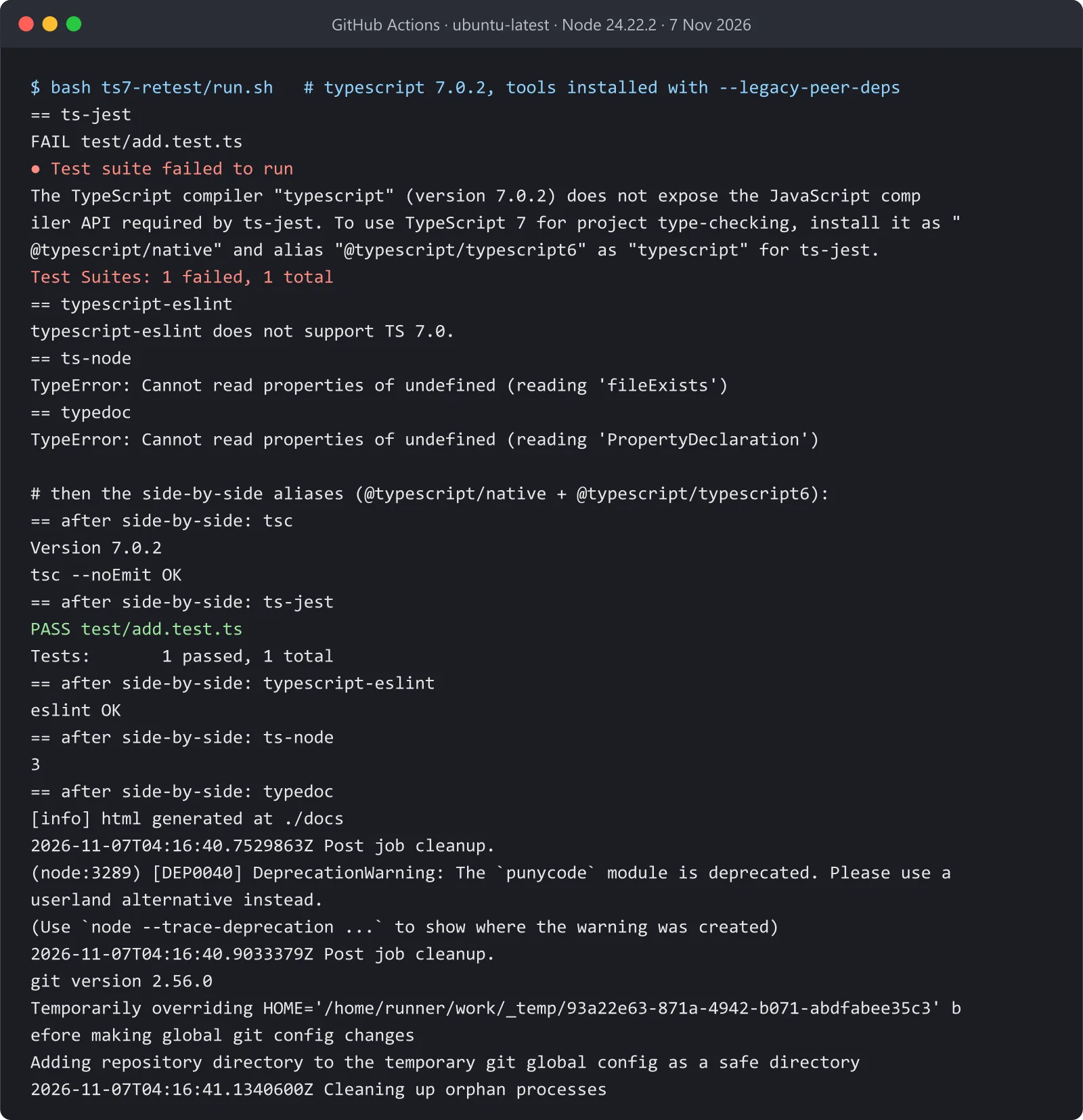
Here is what that looks like in a terminal, from the November 7 run: the four tools failing one after another on plain 7.0.2, then the same commands passing after the side-by-side aliases, with tsc still on 7.0.2.
Status by release: tools and frameworks
Every tool and framework I’ve run on TypeScript 7, in one table, with the release each result comes from. The frameworks were tested from their own starters in the framework test, and the beta in TypeScript 7.1 beta tested.
| Tool or framework | TypeScript 7.0.2 | TypeScript 7.1.0-beta | With TypeScript 6 alongside |
|---|---|---|---|
tsc |
✅ | not re-run | ✅ (tsc stays on 7) |
| tsx, Vitest, ts-morph | ✅ | not re-run | ✅ |
| ts-jest 29.4.15 | ❌ | ❌ | ✅ |
| typescript-eslint 8.72.1 | ❌ | ❌ | ✅ |
| ts-node 10.9.2 | ❌ | ❌ | ✅ |
| TypeDoc 0.28.20 | ❌ | ❌ | ✅ |
| webpack + ts-loader 9.6 | ❌ | not re-run | ✅ |
| Next.js 16 | ✅ | not re-run | not needed |
| Next.js 15.5.29 | ❌ build refuses it | not re-run | passes on TypeScript 6.0.3 |
Angular 22.2 (ng build) |
❌ | ❌ | ✅ |
NestJS 12 (nest build) |
❌ | ❌ | ✅ |
| Vue (vue-tsc 3.3) | ❌ | ❌ | ✅ |
Nuxt 4 (nuxi typecheck) |
❌ type-check only | not re-run | ✅ |
| SvelteKit (svelte-check) | ❌ type-check only | ❌ | ✅ |
Astro (astro check) |
❌ type-check only | ❌ | ✅ on 7.0.2; not re-run on the beta |
The tools’ 7.0.2 results come from the September runs and the re-tests on October 29 and November 7; the frameworks’ from their own test, re-tested on November 2 (Next.js 15 on November 10); the 7.1.0-beta column from the beta test, re-run on November 10. “Type-check only” means the build worked and only the framework’s check command refused TypeScript 7. When a new 7.x release or a new version of one of these tools comes out, the rows are re-run and this table changes first.
The setup that fixed everything
This is Microsoft’s own recommendation from the TypeScript 7.0 announcement: install 7 under a different name for tsc, and put a TypeScript 6 compatibility package where the tools look for typescript.
npm install -D "@typescript/native@npm:typescript@7.0.2" "typescript@npm:@typescript/typescript6@^6.0.2"Which leaves this in package.json:
{
  "devDependencies": {
    "@typescript/native": "npm:typescript@^7.0.2",
    "typescript": "npm:@typescript/typescript6@^6.0.2"
  }
}
What each piece did in my run:
npx tsc --version→ Version 7.0.2. Your builds and type-checks keep the Go compiler’s speed.require('typescript')→ the 6.0.3 API, withts.syspresent. That’s what ts-node, ts-jest, typescript-eslint, TypeDoc and ts-loader need.npx tsc6 --version→ Version 6.0.3, if you ever want the old compiler for comparison.- A strict
npm install, no flags, completed withoutERESOLVE.
Tool by tool
The exact error each tool printed on plain TypeScript 7.0.2, re-run on September 25 and again on October 29. Every one of them passed after switching to the side-by-side setup above.
ts-jest and Jest with TypeScript 7
ts-jest on Jest 30.5.2 stops before running a single test (29.4.13 in September, 29.4.15 on October 29), and its message already names the fix:
● Test suite failed to run
  The TypeScript compiler "typescript" (version 7.0.2) does not expose the JavaScript compiler API required by ts-jest. To use TypeScript 7 for project type-checking, install it as "@typescript/native" and alias "@typescript/typescript6" as "typescript" for ts-jest.
On the side-by-side setup: Tests: 1 passed, 1 total.
Don’t take “install it as @typescript/native” literally. There’s no package with that name on npm, so npm install -D @typescript/native fails:
npm error code E404
npm error 404 Not Found - GET https://registry.npmjs.org/@typescript%2fnative - Not found
@typescript/native is a name you give TypeScript 7 yourself, with npm’s npm: alias syntax. This one command does both halves of what the message asks:
npm install -D "@typescript/native@npm:typescript@7.0.2" "typescript@npm:@typescript/typescript6@^6.0.2"ts-loader and webpack with TypeScript 7
webpack 5.111.1 still writes main.js, but ts-loader 9.6.2 fails the build:
ERROR in ./src/index.ts
Module build failed (from ./node_modules/ts-loader/index.js):
TypeError: Cannot read properties of undefined (reading 'fileExists')
On the side-by-side setup: compiled successfully.
ESLint (typescript-eslint) with TypeScript 7
ESLint 10.11.0 with typescript-eslint 8.70.1 (and 8.72.1 on October 29) refuses to lint at all:
Error: typescript-eslint does not support TS 7.0.On the side-by-side setup: npx eslint src exited 0. More on this one, including the npm error you usually hit first: typescript-eslint does not support TS 7.0.
TypeDoc with TypeScript 7
TypeDoc 0.28.20 crashes while loading, before reading your code:
TypeError: Cannot read properties of undefined (reading 'PropertyDeclaration')On the side-by-side setup: the HTML docs generated normally.
ts-node with TypeScript 7
ts-node 10.9.2 crashes on its first step, reading tsconfig.json:
TypeError: Cannot read properties of undefined (reading 'fileExists')On the side-by-side setup it printed the script’s output. The full write-up: ts-node’s fileExists crash.
tsx, Vitest and ts-morph with TypeScript 7
All three worked on plain TypeScript 7 in the original run, because none of them loads your installed typescript package at run time (see below). If Vitest fails after the upgrade, check the --legacy-peer-deps trap further down first.
Why exactly these five broke
Every failure traces to the same fact. On TypeScript 7.0.2 the package exports two things:
node -p "Object.keys(require('typescript'))"
# [ 'version', 'versionMajorMinor' ]
A tool that calls into the compiler hits undefined on its first real call, and the message depends on which property it reaches for first:
- ts-node and ts-loader read
ts.sys.fileExistswhile loadingtsconfig.json, so both die with the identicalCannot read properties of undefined (reading 'fileExists'). - TypeDoc reaches for
ts.SyntaxKind.PropertyDeclaration:Cannot read properties of undefined (reading 'PropertyDeclaration'). - ts-jest and typescript-eslint check first and fail politely, with messages that name the problem.
The four that survived don’t import TypeScript at run time at all. tsx and Vitest strip types with their own transformers (esbuild for tsx, Vite’s for Vitest), and ts-morph bundles its own copy (@ts-morph/common/dist/typescript.js), so the version you install doesn’t matter to it.
The install error comes first
In a real project you don’t get as far as the runtime errors, because npm refuses first. Three tools declare ranges that exclude 7:
| Package | Accepts typescript |
|---|---|
| typescript-eslint 8.72.1 | >=4.8.4 <6.1.0 |
| ts-jest 29.4.15 | >=4.3 <7 |
| TypeDoc 0.28.20 | 5.0.x … 6.0.x |
| ts-node 10.9.2 | >=2.7 (accepts 7, then crashes) |
| ts-loader 9.6.2 | * (accepts 7, then crashes) |
That last pair is the dangerous kind: the ranges say yes, so npm installs quietly and the failure arrives later, at run time.
The --legacy-peer-deps trap
The first answer people find for ERESOLVE is --legacy-peer-deps. It did get TypeScript 7 installed. It also broke Vitest:
Error [ERR_MODULE_NOT_FOUND]: Cannot find package 'vite' imported from
.../node_modules/vitest/dist/chunks/index.DzobfTyw.js
That flag doesn’t only skip the conflicting check; it skips installing every peer dependency, and Vitest relies on npm to bring in Vite as one. Adding Vite back by hand made Vitest pass on TypeScript 7 again, which is how I know it was the flag and not the compiler.
Should you upgrade?
- If you only run
tsc(plus tsx, Vitest or a bundler), plain TypeScript 7 worked in every check here. - If you use any tool in the ❌ rows, use the side-by-side setup. It’s the supported path until TypeScript 7.1 ships its new API, and TypeScript’s team says 7.1’s API will be different, so each of these tools will need its own update even then.
- Don’t pin
typescript@6and forget it. It works, but you give up the new compiler for your builds, which is the whole point of 7.
The individual errors have their own write-ups: ts-node’s fileExists crash and typescript-eslint “does not support TS 7.0”.
Frameworks were tested separately, from their own starters: Does Next.js, Angular, Vue or NestJS work with TypeScript 7?
The whole upgrade, including the tsconfig options TypeScript 7 rejects: TypeScript 7 migration guide.
Type-checking with Bun instead: bun check vs tsc 7, timed on Zod and Hono.
Run it yourself
The setup is on GitHub with scripts that break it and restore it, so you can watch each failure and fix on your own machine. The CI version, which installs both the versions above and the latest of each tool, is ts7-retest (latest run):
git clone https://github.com/nils44344/node-ts-error-repros
cd node-ts-error-repros/05-typescript-7-side-by-side
npm install && npm run all
How this was measured
- One project, three setups, nothing else changed: the same
tsconfig.json, source, test files and tool versions, with only thetypescriptentries inpackage.jsondiffering. - Eleven tasks per setup:
tsc --version,tsc --noEmit, ts-node, tsx, Jest with ts-jest, ESLint with and without type information, a ts-morph script, TypeDoc, Vitest, and a webpack build with ts-loader. - Strict install first, to record what npm refuses, then
--legacy-peer-depsso the tools could be run and their own errors recorded. - Every failure was chased to its cause. Vitest’s apparent failure was traced to the install flag and re-tested before it was left out of the TypeScript 7 column.
Limits of this test
- One small project on Windows. Large monorepos, project references and custom transformers weren’t tested.
- Framework CLIs were tested separately, from each framework’s own starter; their results are in the status table above and in the framework test.
- This is a snapshot of September 2026. TypeScript 7.1 and new releases of these tools will change the answers; this entry will be re-tested when they land.
— N.K., end of entry No.019