The error, verbatim
Jump to the fix ↓X [ERROR] Your Worker failed validation because it exceeded startup limits.
A request to the Cloudflare API (/accounts/.../workers/scripts/nk-repro-cpu/versions) failed.
- Error: Script startup exceeded CPU time limit.
[code: 10021]
The fix that worked
Profile what runs at startup:
npx wrangler check startupTested on
- wrangler
- 4.139.0; 4.158.0 (limit search, November 8)
- Worker
- compatibility_date 2026-09-01
- Plan
- Workers Paid
- OS
- Windows 11 Pro
Contents
Everything at the top level of your Worker, outside the fetch handler, runs once when Cloudflare starts it up, before any request. Cloudflare checks how long that takes when you deploy, and rejects the upload if it’s too slow. Nothing about your requests is involved yet.
The fix
1. Find the slow code. When the deploy fails, wrangler writes a CPU profile of the startup for you and prints where:
A CPU Profile of your Worker's startup phase has been written to .wrangler\tmp\startup-profile-qtzDoy\worker.cpuprofile - load it into the Chrome DevTools profiler (or directly in VSCode) to view a flamegraph.You can also make one before deploying:
npx wrangler check startup2. Do that work ahead of time, not at startup. If the slow part builds a value that’s the same every time (a lookup table, a parsed file, a computed constant), compute it once in a build script and ship the result in the bundle.
What I measured
A Worker doing a big calculation at the top level, deployed to a test Worker with wrangler 4.139.0:
| Top-level work | Deploy |
|---|---|
| lighter version | accepted, Worker Startup Time: 435 ms |
| heavier version | rejected, Script startup exceeded CPU time limit [code: 10021] |
| result shipped as a constant | accepted, Worker Startup Time: 2 ms |
Wrangler’s own advice under the error:
Try reducing the amount of work done during startup (outside the event handler), either by removing code or relocating it inside the event handler.Where the limit really is: about 850 to 930 ms, and it wobbles
Cloudflare’s docs say startup has to finish within one second. I wanted to know where the deploy actually starts saying no, so on November 8, 2026 I deployed the same Worker 21 times with wrangler 4.158.0, changing only how many times a loop runs at the top level, and wrote down what each deploy reported:
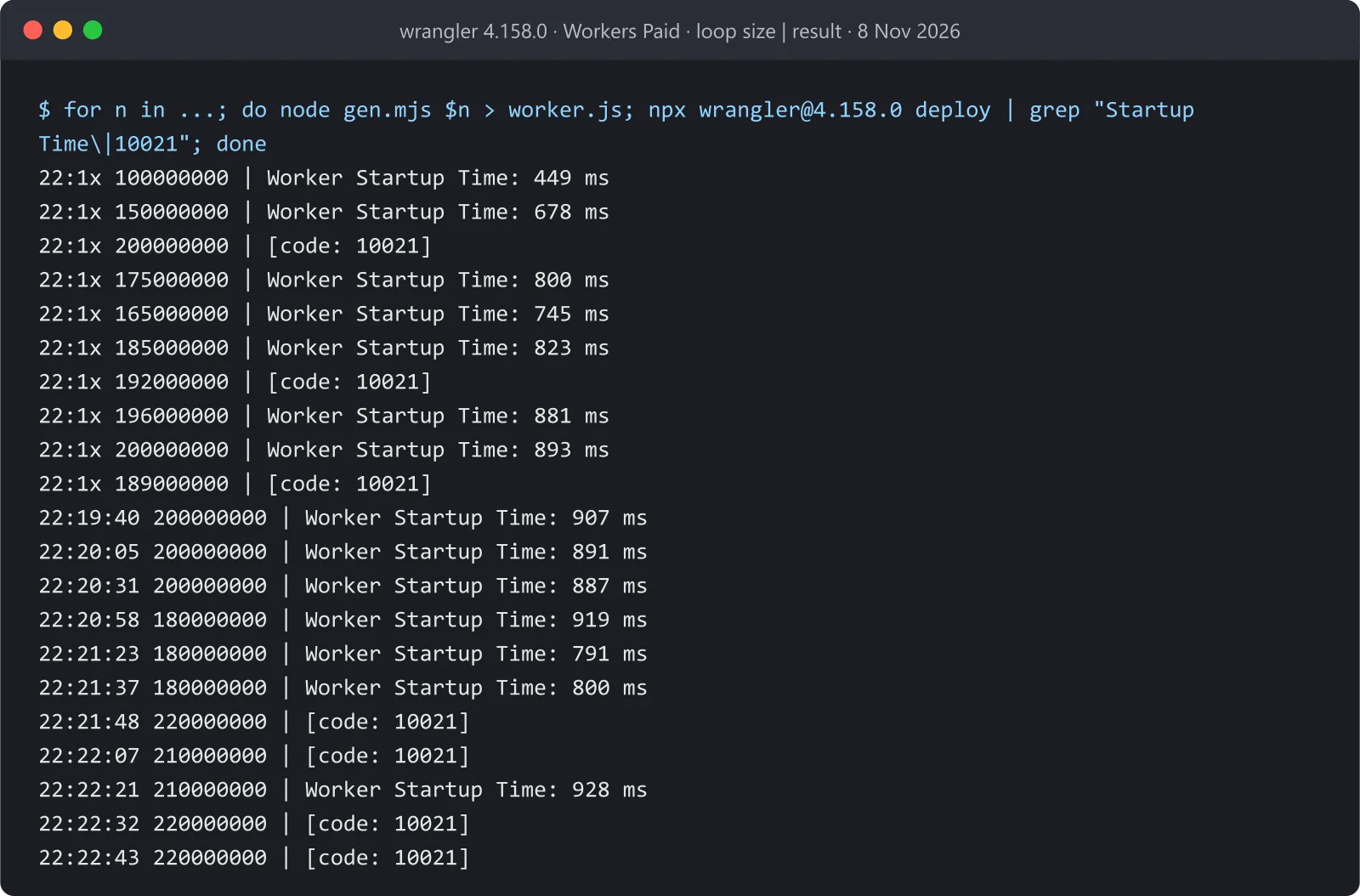
What the log shows:
- Nothing above 928 ms was accepted. That was the highest startup time any deploy reported. The largest size, 220 million loop rounds, was rejected all three times.
- Below about 800 ms, every deploy passed. All the sizes that measured 449 to 823 ms went through each time.
- In between it’s a coin toss. The 200-million version was rejected on its first deploy, then accepted four times in a row at 887 to 907 ms. The 210-million version failed once and passed once. Two sizes slightly smaller than 200 million (189 and 192 million) were each rejected on their only try.
- The same code measured differently each time. The 180-million version reported 919 ms, then 791 ms, then 800 ms, a few minutes apart.
So the line isn’t a clean 1,000 ms. In practice the check started failing somewhere from roughly 850 ms, and it measures on whatever machine your upload lands on, so a Worker near the edge can pass today and fail on the next deploy with no change to the code. If your deploy log shows a startup time above 800 ms, treat it as a warning and cut the startup work now, before a routine deploy fails on a busy day.
wrangler check startup doesn’t tell you this either. It runs the startup on your own machine: for the 100-million version it reported 949 ms of active time on my PC, while Cloudflare reported 449 ms for the same file. Use it to find what is slow (the flamegraph), not to predict whether the deploy will pass.
Why moving it into the handler isn’t enough
“Relocate it inside the event handler” gets the deploy through, but the work still happens, just on a request instead. I moved the same calculation into fetch, computed once and then kept in a variable:
So only move it into the handler if it’s work that doesn’t have to happen on most requests. If every request needs it, precompute it.
Test setup
A test Worker on workers.dev, deployed with wrangler 4.139.0 on a Workers Paid account: a top-level loop sized so one version passed and one failed the startup check, the same loop moved lazily into fetch, and the result shipped as a constant. Startup times and errors are copied from wrangler’s output, and the per-request CPU from wrangler tail. Cloudflare’s limits page says startup must finish within 1 second.
November 8, 2026: the limit search above, 21 deploys of the same loop Worker at 11 sizes with wrangler 4.158.0 from Windows 11 to a Workers Paid account, plus one local wrangler check startup. The generator, config and full log are public.
— N.K., end of entry No.033